Create your app out reusable, self-contained view components. These will be created with the component recipe for Angular 1.5+ (or "element directives" for Angular 1.4 and below).
Components are what make up the more complex "view pieces" of your app, which when pieced together, form pages of your app.
Components / Element Directives
Some examples of components in our Heroes app could be:
<my-heroes-list><my-hero-detail><my-top-heroes>
See the Angular 2 tutorial at https://angular.io/docs/ts/latest/tutorial/ for examples of these.
Simple Example
To pick a very simple example, let's analyze what the <my-heroes-list>
component might look like. This component will show the list of heroes
with their IDs, and allow the user to select one.
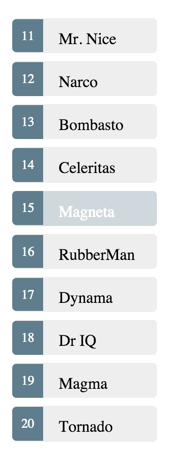
Here is the code for this component:
my-heroes-list.html
<ul class="heroes-list">
    <li class="heroes-list__hero"
        ng-repeat="hero in $ctrl.heroes"
        ng-class="{ 'heroes-list__hero--selected': hero === selectedHero }"
        ng-click="$ctrl.selectHero( hero )">

        <span class="heroes-list__badge"></span>
    </li>
</ul>
my-heroes-list.js
angular.module( 'heroes' ).component( 'myHeroesList', {
    bindings : {
        heroes       : '<',
        onHeroSelect : '&'
    },

    templateUrl : 'heroes-list/my-heroes-list.html',
    controller  : MyHeroesListController
} );


function MyHeroesListController() {
    var ctrl = this;

    ctrl.selectedHero = null;

    /**
     * @param {Hero} hero
     */
    ctrl.selectHero = function( hero ) {
        ctrl.selectedHero = hero;

        ctrl.onHeroSelect( { $hero: hero } );  // notify listeners
    }
}
And finally, how we might instantiate this component from a page:
<my-heroes-list
    heroes="$ctrl.heroes"
    on-hero-select="$ctrl.onHeroSelect( $hero )"></my-heroes-list>
Couple of key points here:
Component (or Element Directive): Always use the Angular Component Recipe (or an element directive for Angular 1.4 and below) for your components. An HTML element like
<my-heroes-list></my-heroes-list>makes more sense than attaching an attribute directive such as<div my-heroes-list></div>.Inputs for the data needed: You want your component to be self-contained and reusable for multiple pages, or in multiple spots on the same page with different data.
Because the component has an isolate scope, you will "pass in" the data it needs via attributes. In this example, data is passed in via theheroesattribute instead of having the component load its own data. This is what is going to allow you to reuse the component for multiple purposes, and also allow the containing page to better control loading spinners and such. More on this in point #5 below.Attributes for 'Events': Use attributes for when "events" happen within the component. In this example, this is the job of the
on-hero-selectattribute, which allows the owning page controller to respond to when a hero is clicked.Performing DOM Manipulation on Initialization: With Angular 1.5+, the
$postLinkfunction can be implemented in your controller.
Example Controller (Angular 1.5+):function MyController( $element ) { var ctrl = this; ctrl.$postLink = function() { $element.querySelector( '.my-child' ).classList.add( 'my-class' ); } }Single Responsibility: At a core level, a component should simply be responsible for taking in some data, and displaying it to the user. It essentially only center around formatting the data for the view (if needed), and handling user input events on the component.
Generally, don't call services from within the component - it's the job of the owning page controller to provide the data, and display loading indicators and such. This makes the component flexible in that it can be fed data from one or more data sources, and be reused on multiple pages.
Also, don't do generalized data transformations/filtering, which is likely the job of a service, or models and collections. Think: "If I need to use this logic somewhere else in the app, where would it be reusable from?"- Note: There are some exceptions to the rule of not loading data from the component. For instance, you may have a complex modal dialog that is used in many places in your app, and needs to load data from a few places, show its own loading indicators, etc. In this case, it might be best to let the component load the data, despite tying it to a given data source. Ultimately the decision is yours, but for the most part keeping your logic in your services/models and collections, and providing the data to the component via the page controller ensures that you will allow for the most reuse of your component possible.
For how to test, see Testing Components.
Next Article: Pages