Pages are what make up your app, and are the highest level in the "tree of components" design. They facilitate the interaction between your lower-level view components, and your services. They are responsible for:
- Loading the data for the page
- Showing any "Loading..." indicators needed, and
- Passing the data to the appropriate child components when loaded.
                                     1. Data Requested from Service
                                         |
             ++==================++      v
             ||                  ||               +-----------------+
             ||      (Page)      ++--------------->                 |
             ||                  ||               |    (Service)    |
             || Heroes Dashboard ||               |                 |
             ||                  <<- - - - - - - -+  Heroes Service |
             ||                  ||               |                 |
             ||                  ||          ^    +-----------------+
             ++=========+========++          |
                        |                 2. Data Returned
                        |
              +---------+--------+
              |                  |   <- 3. Data Fed to Components
              |                  |
    +---------v------+     +-----v---------+
    |                |     |               |
    |  (Component)   |     |  (Component)  |
    |                |     |               |
    |   Navigation   |     |  Heroes List  |
    |      Tabs      |     |               |
    |                |     |               |
    +----------------+     +---------------+
Example Page:
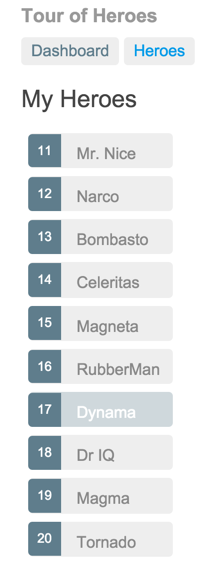
Creating Pages as Components
You should create pages as self-contained view components. A component creates a tag for the page, and gives the ability to use attributes for input (more on that later).
Directory structure:
app/
    heroes-list/
        heroes-list.html
        heroes-list.js
    heroes-list-page/  # The "Page" holds the heroes-list, plus the title and tabs
        heroes-list-page.html
        heroes-list-page.js
    app.js
(see File Organization article for details)
Page Controllers
Page controllers have the responsibility of calling your service layer to retrieve data, and expose it to be consumed by your lower-level view components.
In general, page controllers should load data rather than individual component controllers, so that it's left to the page to control loading spinners and coordinate between potentially multiple service calls / data sources.
my-heroes-list-page.js
angular.module( 'heroes' ).component( 'myHeroesList', {
    templateUrl : 'heroes-list-page/my-heroes-list-page.html',
    controller  : MyHeroesListPageController
} );


function MyHeroesListPageController( HeroesService ) {
    var ctrl = this;

    ctrl.PageState = { LOADING: 0, LOADED: 1, ERROR: 2 };

    ctrl.pageState = ctrl.PageState.LOADING;
    ctrl.heroes = null;

    loadHeroes();


    function loadHeroes() {
        ctrl.pageState = ctrl.PageState.LOADING;

        HeroesService.loadHeroes().then(
            onLoadHeroesSuccess,
            onLoadHeroesError
        );
    }

    /**
     * @param {Heroes[]} heroes
     */
    function onLoadHeroesSuccess( heroes ) {
        ctrl.pageState = ctrl.PageState.LOADED;
        ctrl.heroes = heroes;
    }

    /**
     * @param {HttpError} error
     */
    function onLoadHeroesError( error ) {
        ctrl.pageState = ctrl.PageState.ERROR;
        ctrl.error = error.toString();
    }
}
Page HTML
<h1>My Heroes</h1>

<my-loading-spinner
    ng-if="$ctrl.pageState === $ctrl.PageState.LOADING"></my-loading-spinner>

<my-heroes-list
    ng-if="$ctrl.pageState === $ctrl.PageState.LOADED"
    heroes="$ctrl.heroes"></my-heroes-list>

<div ng-if="$ctrl.pageState === $ctrl.PageState.ERROR">
    An error occurred: {{ $ctrl.error }}
</div>
Other Notes
A page is also responsible for:
- Collecting any user input data and passing it to a service for persistence when ready (as opposed to your components talking directly to a service).
- Navigating the user to any other pages (via links on the page, when a form is submitted successfully, etc.)
For how to test, see Testing Pages.
Next Article: Router